
XTRA Tutorials
 
  • Getting Started
    • Installing XTRA
    • License Activation
    • Installing Plugins
    • Importing Demo Content
    • Assigning Home Page
    • Updating XTRA
    • Child Theme
  • Page Builder
    • Create a New Page
    • Elements Overview
    • List of Elements
    • General Settings
    • Header Settings
    • SEO Settings
  • Theme Options
    • Options Overview
    • General
      • Layout
      • Colors & Styles
      • Share Icons
      • SEO Meta Tags
      • Loading
      • Page 404
      • Custom Codes
      • White Label
      • Advanced
    • Typography
    • Header
      • Logo
      • Social Icons
      • Header
      • Sticky Header
      • Mobile Header
      • Fixed Side
      • Title and Breadcrumbs
    • Footer
      • Footer Top Bar
      • Footer Widgets
      • Footer Bottom Bar
      • Footer More
    • Blog
      • Blog Settings
      • Blog Styling
      • Blog Single Settings
      • Blog Single Styling
      • Search
    • Portfolio
      • Portfolio Slug & Title
      • Portfolio Settings
      • Portfolio Styling
      • Portfolio Single Settings
    • WooCommerce Pro
      • Products Settings
      • Products Styling
      • Product Settings
      • Product Styling
    • Site Identity
    • Menus
    • Widgets
    • Homepage Settings
    • WooCommerce
    • Additional CSS
    • Backup / Restore
  • Edit Guide
  • How to
  • Developer
Buy Theme
Changelog
XTRA WordPress Theme TutorialsYou arrived at the right place, How we can help you?
XTRA Tutorials
  • Getting Started
    • Installing XTRA
    • License Activation
    • Installing Plugins
    • Importing Demo Content
    • Assigning Home Page
    • Updating XTRA
    • Child Theme
  • Page Builder
    • Create a New Page
    • Elements Overview
    • List of Elements
    • General Settings
    • Header Settings
    • SEO Settings
  • Theme Options
    • Options Overview
    • General
      • Layout
      • Colors & Styles
      • Share Icons
      • SEO Meta Tags
      • Loading
      • Page 404
      • Custom Codes
      • White Label
      • Advanced
    • Typography
    • Header
      • Logo
      • Social Icons
      • Header
      • Sticky Header
      • Mobile Header
      • Fixed Side
      • Title and Breadcrumbs
    • Footer
      • Footer Top Bar
      • Footer Widgets
      • Footer Bottom Bar
      • Footer More
    • Blog
      • Blog Settings
      • Blog Styling
      • Blog Single Settings
      • Blog Single Styling
      • Search
    • Portfolio
      • Portfolio Slug & Title
      • Portfolio Settings
      • Portfolio Styling
      • Portfolio Single Settings
    • WooCommerce Pro
      • Products Settings
      • Products Styling
      • Product Settings
      • Product Styling
    • Site Identity
    • Menus
    • Widgets
    • Homepage Settings
    • WooCommerce
    • Additional CSS
    • Backup / Restore
  • Edit Guide
  • How to
  • Developer

How to Set a Fixed Footer on Your Website: A Step-by-Step Guide?

Home Latest Posts How to

What is the fixed footer?

Step 1
?

Fixed Footer

This is a fixed footer:

Your browser does not support the video tag.

I am raw html block.
Click edit button to change this html

How?
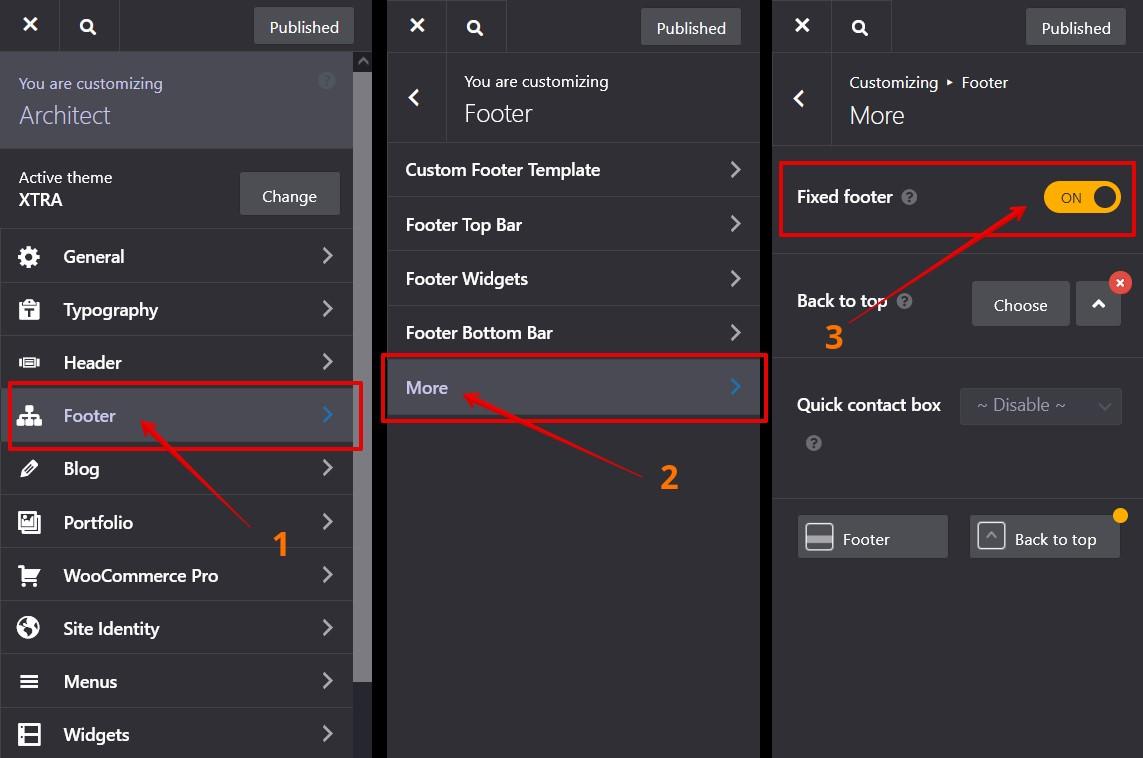
How to turn ON the fixed footer?

Go to Theme Options (Theme Customize)

  1. Go to Footer
  2. Navigate to More panel
  3. Turn On the Fixed Footer option
Fixed footer

How to

fixed footerfooter

FacebookXDeliciousLinkedinWhatsappTelegramEmailPrintShortlink
  • PreviousHow to Set Up a Preloader for Your Website?

  • NextHow to Enable PWA (Progressive Web App) on Your Website?

Comments are disabled

XTRA WordPress Theme

XTRA Popular WordPress Theme 2026

Recommended for you …

Bundled Plugins: License and Activation FAQs Explained

14 June 2024

How to Change Product Page Tabs to Vertical Mode?

13 June 2024

How to Change the Post Date Format on Your WordPress Website?

11 June 2024

How to Fix Desktop Menu Displaying as Mobile Menu ?

6 June 2024

How to Add an Off-Canvas Menu Icon in the Header for Desktop Only?

26 June 2024

How to change mobile menu copyright text?

17 June 2024

How to Transfer a Purchase Code to Another Domain Name?

5 June 2024

How to Add a ‘Sold Out’ Badge to Out of Stock Products?

14 June 2024
If you can't find your answer on this documentation
Submit a ticketSubmit a ticket
© 2026 XTRA WordPress theme documentation.
FacebookInstagramYoutubeDribbble
This website uses cookies to improve user experience.Accept and close
Buy and Download XTRA Theme Purchase Theme Xtra Theme Documentation Documentation Xtra Theme Videos Tutorials Video Tutorials Xtra Theme Support Center Support center Xtra Theme Showcase Showcase