
PWA
Install XTRA Theme PWA

Install our website's web application on your home screen for quick and easy access every time your are on the go.

Just tap Share then 'Add to home screen'Just tap Share then 'Add to home screen'
XTRA Tutorials
 
  • Getting Started
    • Installing XTRA
    • License Activation
    • Installing Plugins
    • Importing Demo Content
    • Assigning Home Page
    • Updating XTRA
    • Child Theme
  • Page Builder
    • Create a New Page
    • Elements Overview
    • List of Elements
    • General Settings
    • Header Settings
    • SEO Settings
  • Theme Options
    • Options Overview
    • General
      • Layout
      • Colors & Styles
      • Share Icons
      • SEO Meta Tags
      • Loading
      • Page 404
      • Custom Codes
      • White Label
      • Advanced
    • Typography
    • Header
      • Logo
      • Social Icons
      • Header
      • Sticky Header
      • Mobile Header
      • Fixed Side
      • Title and Breadcrumbs
    • Footer
      • Footer Top Bar
      • Footer Widgets
      • Footer Bottom Bar
      • Footer More
    • Blog
      • Blog Settings
      • Blog Styling
      • Blog Single Settings
      • Blog Single Styling
      • Search
    • Portfolio
      • Portfolio Slug & Title
      • Portfolio Settings
      • Portfolio Styling
      • Portfolio Single Settings
    • WooCommerce Pro
      • Products Settings
      • Products Styling
      • Product Settings
      • Product Styling
    • Site Identity
    • Menus
    • Widgets
    • Homepage Settings
    • WooCommerce
    • Additional CSS
    • Backup / Restore
  • Edit Guide
  • How to
  • Developer
Buy Theme
Changelog
XTRA WordPress Theme TutorialsYou arrived at the right place, How we can help you?
XTRA Tutorials
  • Getting Started
    • Installing XTRA
    • License Activation
    • Installing Plugins
    • Importing Demo Content
    • Assigning Home Page
    • Updating XTRA
    • Child Theme
  • Page Builder
    • Create a New Page
    • Elements Overview
    • List of Elements
    • General Settings
    • Header Settings
    • SEO Settings
  • Theme Options
    • Options Overview
    • General
      • Layout
      • Colors & Styles
      • Share Icons
      • SEO Meta Tags
      • Loading
      • Page 404
      • Custom Codes
      • White Label
      • Advanced
    • Typography
    • Header
      • Logo
      • Social Icons
      • Header
      • Sticky Header
      • Mobile Header
      • Fixed Side
      • Title and Breadcrumbs
    • Footer
      • Footer Top Bar
      • Footer Widgets
      • Footer Bottom Bar
      • Footer More
    • Blog
      • Blog Settings
      • Blog Styling
      • Blog Single Settings
      • Blog Single Styling
      • Search
    • Portfolio
      • Portfolio Slug & Title
      • Portfolio Settings
      • Portfolio Styling
      • Portfolio Single Settings
    • WooCommerce Pro
      • Products Settings
      • Products Styling
      • Product Settings
      • Product Styling
    • Site Identity
    • Menus
    • Widgets
    • Homepage Settings
    • WooCommerce
    • Additional CSS
    • Backup / Restore
  • Edit Guide
  • How to
  • Developer

Element: Gradient

Home Latest Posts Page Builder

Video Tutorial

Description and Screenshot

Step 1
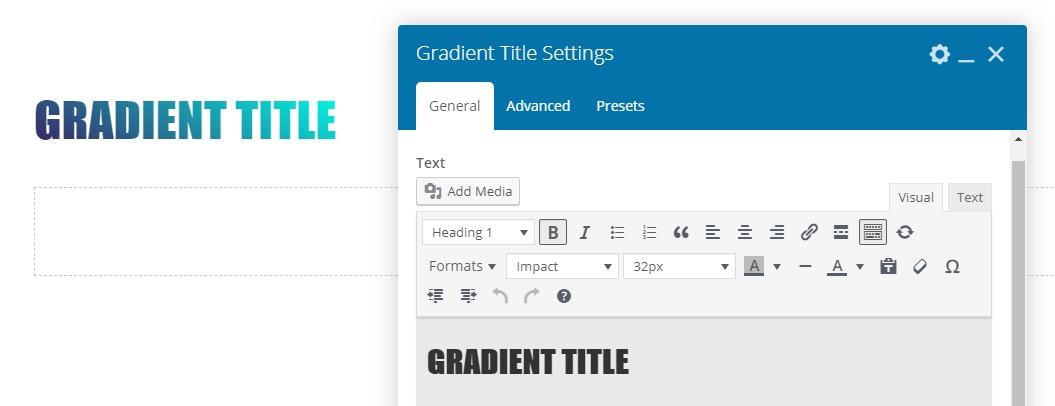
Title with inside gradient background color or background image or gif animation for background purpose

Gradient1
  • Text – Set you text, title, or contnet
  • Background – Set background colors or image
  • Presets – This element have multiple stylish presets that you can use them
  • Advanced tab – Responsive, Animation, Parallax, etc.

Page Builder

gradienttexttitle

FacebookXDeliciousLinkedinWhatsappTelegramEmailPrintShortlink
  • PreviousElement: Google Map

  • NextElement: History Line

Related Posts ...

Placeholder

Gradient Overlay Option for Gallery & Text Marquee Elements

Theme Options
Placeholder

How to Change the Title Background on Your Website?

How to
Placeholder

Theme Options: Site Identity

Theme Options
Placeholder

Theme Options: Title and Breadcrumbs

Theme Options
Placeholder

codevz/after_title_and_breadcrumbs

Developer
Placeholder

codevz/before_title_and_breadcrumbs

Developer

XTRA WordPress Theme

XTRA Popular WordPress Theme 2026

Recommended for you …

How to Add or Remove Items from Mobile Fixed Navigation

18 August 2024

How to Fix a Google Map That Stopped Working?

14 June 2024

How to Change the Menu Display Location?

25 September 2024

How to Fix the Missing style.css Stylesheet Error: A Step-by-Step Guide?

13 June 2024

How to Add Brands to Your Products in WooCommerce?

29 August 2024

How to Disable RTL Numbers on an English Language Website?

15 August 2024

How to Create Custom Header and Footer Templates Using Elementor?

27 August 2024

How to Update the XTRA Theme and Plugins?

27 June 2024
If you can't find your answer on this documentation
Submit a ticketSubmit a ticket
© 2025 XTRA WordPress theme documentation.
FacebookInstagramYoutubeDribbble
This website uses cookies to improve user experience.Accept and close
Buy and Download XTRA Theme Purchase Theme Xtra Theme Documentation Documentation Xtra Theme Videos Tutorials Video Tutorials Xtra Theme Support Center Support center Xtra Theme Showcase Showcase